
Seat Reservation App
(Movie Theatre)
OVERVIEW
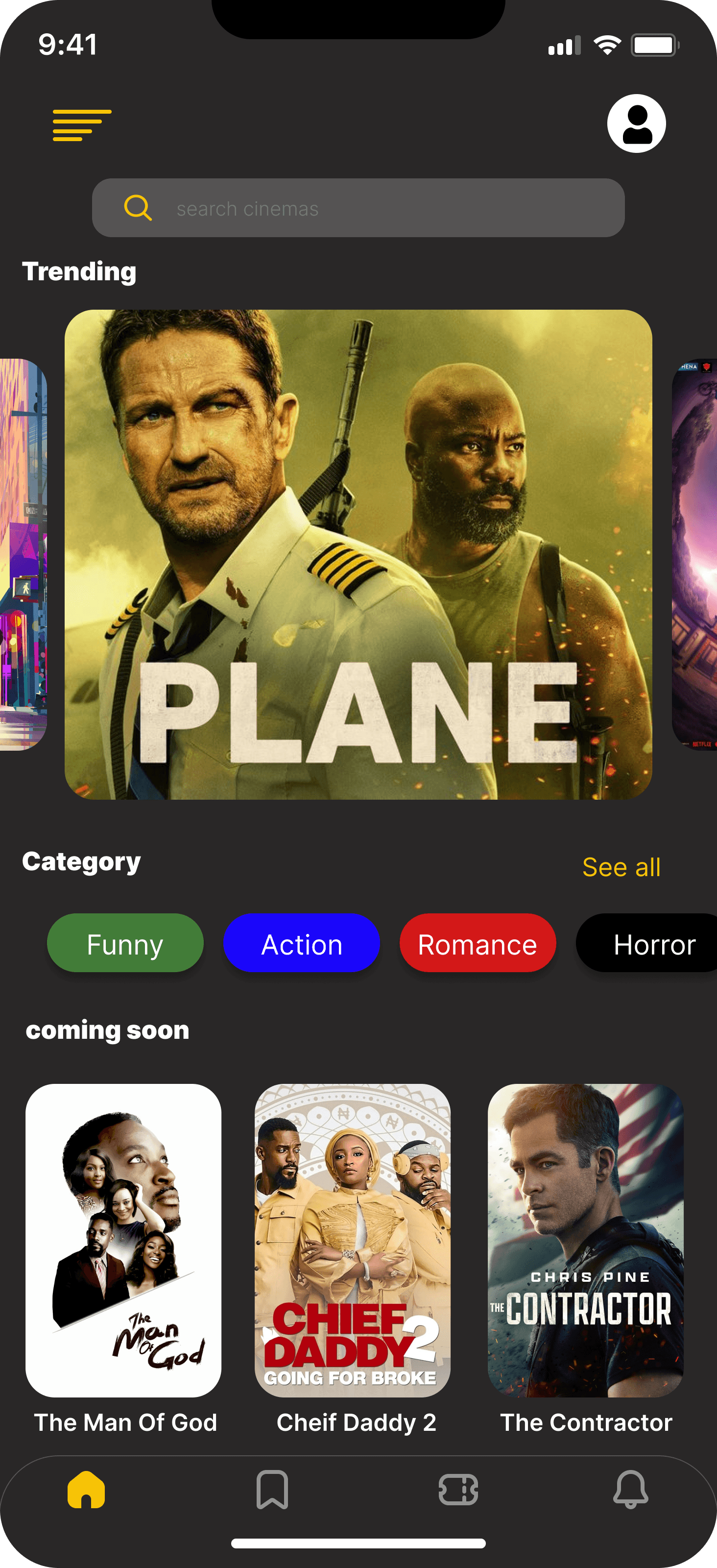
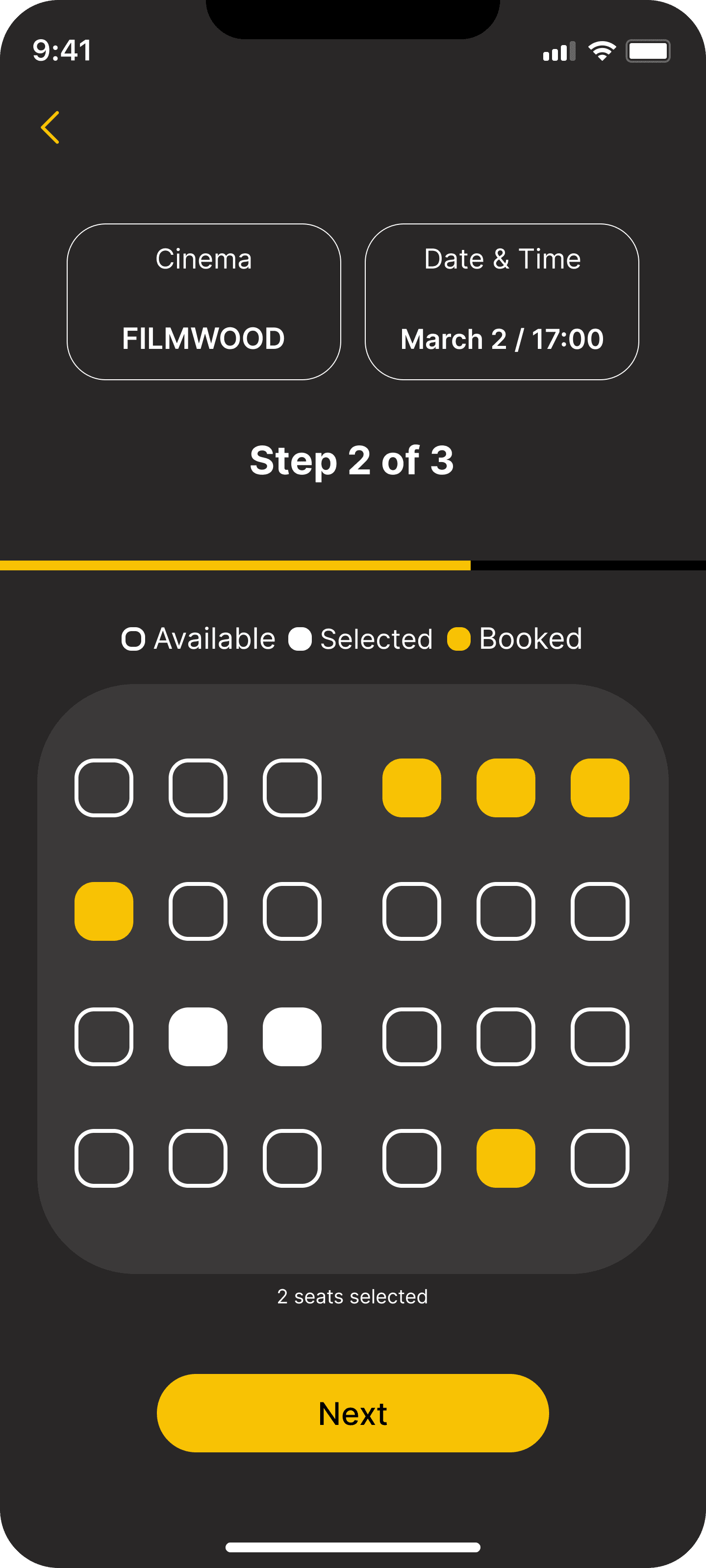
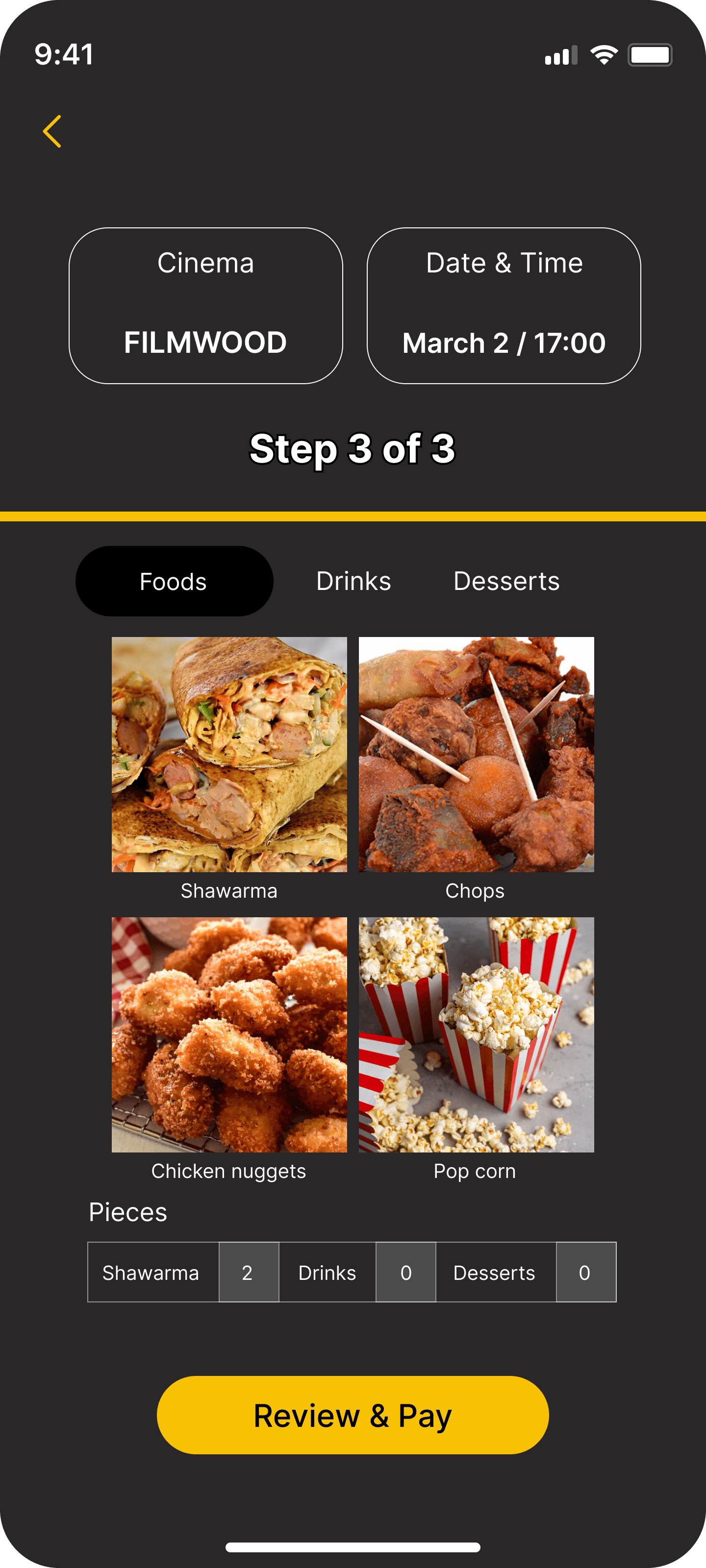
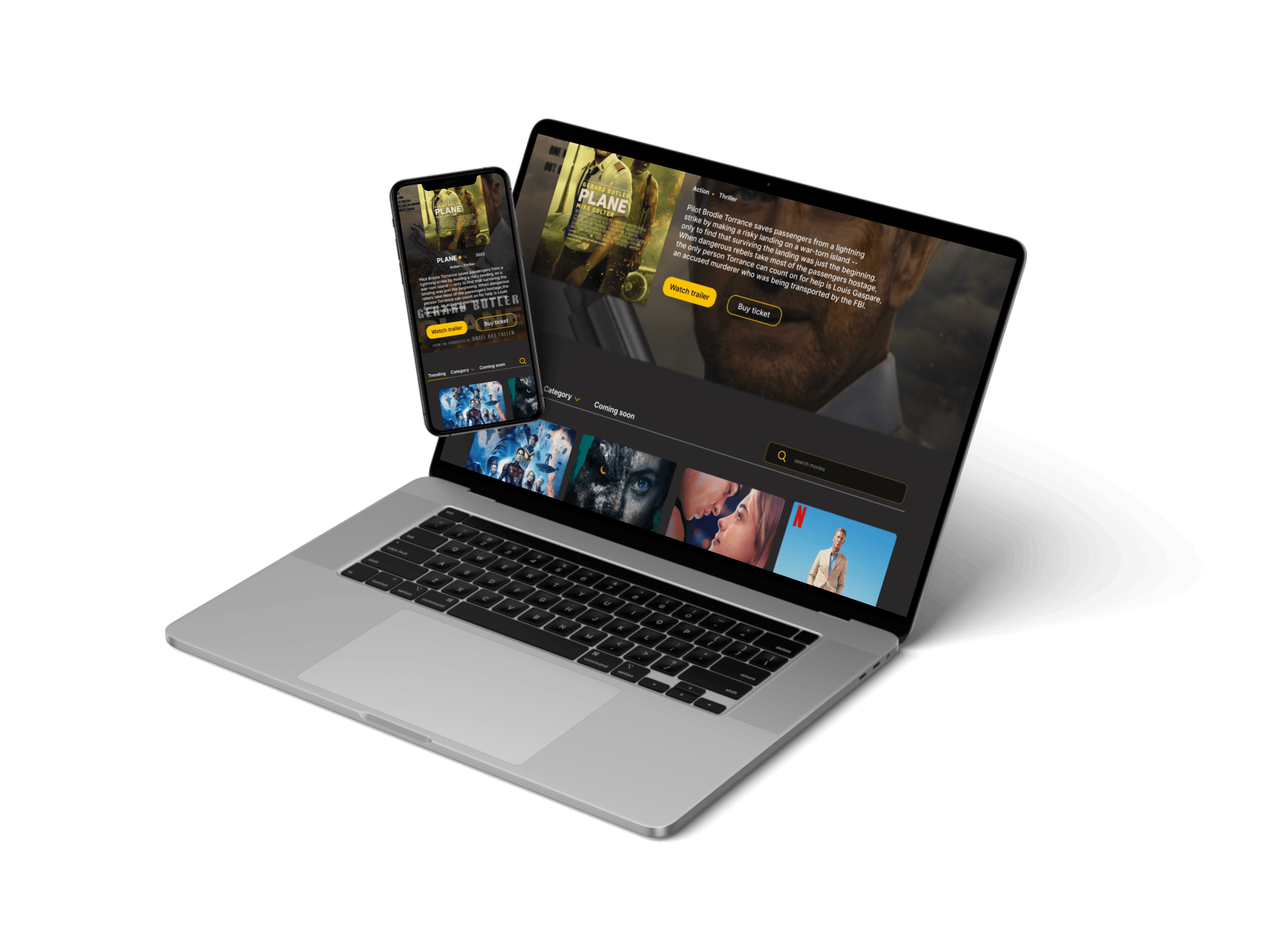
The Movie Reservation App is a mobile and web-compatible application allowing users to effortlessly book film tickets and choose seats at their preferred cinema, enhancing the movie-watching experience without traveling great distances. This app caters to film enthusiasts who frequently attend movie theaters.
MY ROLE
UX Research
User interviews
UI Design
Wireframe & prototype
Duration :
October 2022 - November 2022
Problem
Most users are unable stand in line to get ticket and they end up seating where isn’t convenient for them.
Solution
Design a mobile app / website app to help users easily buy tickets online & select seats, so they can skip in store lines.
DESIGN PROCESS
Empathize
Market research
Problem findings
User survey
and interviews
Define
Empathy maps
User personas
Ideate
Sketch
Wireframes
Site map
Prototype
Low-fi & Hi-fi
Wireframes
Interactions
Test
Usability study
& testing
USER RESEARCH
I carried out interviews and developed empathy maps to comprehend the users I'm designing for and their needs. During the research, I discovered that most users don't have the patience to wait in line for tickets. The research also uncovered that time constraints were not the only factor preventing users from attending the movies. Additional user issues include; being unable to select preferred seating and screen, locating nearby cinemas, and receiving suggested directions to the cinema.
Pain Points
1
Time
Most users don’t have
the time for in-store line
to buy ticket.
2
Seat reservation
Platforms don’t offer
users the option
for selecting seat choice.
3
Resheduling
Customers require choices
to reschedule film timing
and dates if they're
unable to attend.
Findings
1
Users need more option
on how to easily select
movies.
2
Users need better image
information and well
developed design.
3
Customers require a more
user-friendly approach
for clicking and accessing icons.
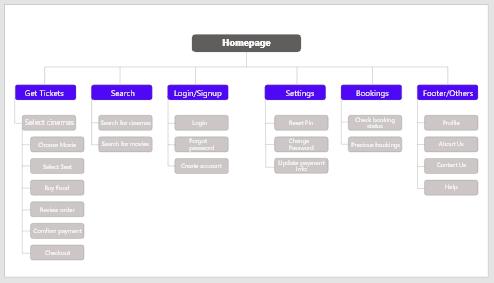
SITE MAP
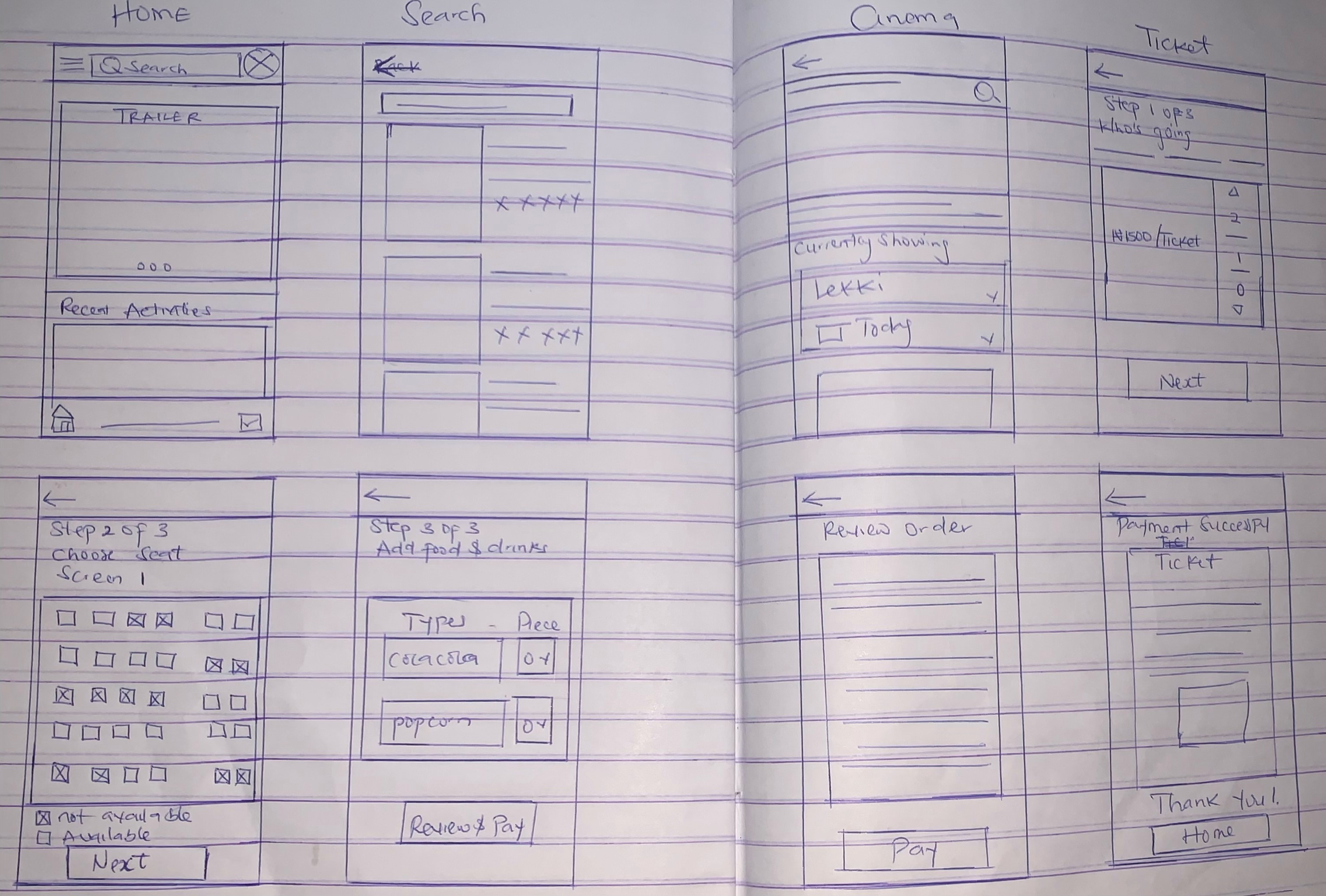
SKETCHES
USABILITY STUDY
I conducted a usability study, The study helped guide the design from wireframes to mockups, & revealed what aspects of the mockups needed refining.
WHAT I LEARNED
When I began creating the app, I was uncertain about the appropriate design to implement for delivering an optimal user experience. However, by conducting user research, usability studies, and receiving peer feedback, I gained a deeper comprehension of users' requirements and how to provide an exceptional user experience within the app.
NEXT STEPS
Carry out additional rounds of user testing to confirm if the issues faced by users have been successfully resolved. Conduct further user research to enhance design.
Seat Reservation App (Movie Theatre)
Seat Reservation App (Movie Theatre)
PROBLEM
Most users are unable stand in line to get ticket and they end up seating where isn’t convenient for them.
SOLUTION
Design a mobile app / website app to help users easily buy tickets online & select seats, so they can skip in store lines.
OVERVIEW
Seat reservation app is a mobile app / website app for people to easily book movie and select seats from any movie theatre of choice, making it easy to have fun and see movies without going through miles, the app targets customers who loves to go to the movies.
Duration : October 2022 - November 2022
MY ROLE
UX Research
User interviews
UI Design
Wireframe & prototype
OVERVIEW
The Movie Reservation App is a mobile and web-compatible application allowing users to effortlessly book film tickets and choose seats at their preferred cinema, enhancing the movie-watching experience without traveling great distances. This app caters to film enthusiasts who frequently attend movie theaters.
Duration : October 2022 - November 2022
MY ROLE
UX Research
User interviews
UI Design
Wireframe & prototype
PROBLEM
Most users are unable stand in line to get ticket and they end up seating where isn’t convenient for them.
SOLUTION
Design a mobile app / website app to help users easily buy tickets online & select seats, so they can skip in store lines.
DESIGN PROCESS
Empathize
Market research
Problem findings
User survey
and interviews
Prototype
Wireframes
Prototyping
Low-fi & Hi-fi
Test
Usability study
& Testing
Ideate
Sketch
Wireframes
Site map
Define
Empathy maps
User personas
USER RESEARCH
I carried out interviews and developed empathy maps to comprehend the users I'm designing for and their needs. During the research, I discovered that most users don't have the patience to wait in line for tickets. The research also uncovered that time constraints were not the only factor preventing users from attending the movies. Additional user issues include; being unable to select preferred seating and screen, locating nearby cinemas, and receiving suggested directions to the cinema.
Pain Points
1
Time
Most users don’t have
the time for in-store line
to buy ticket.
2
Seat reservation
Platforms don’t offer
users the option
for selecting seat choice
3
Resheduling
Users needs options to be
able to reschedule movie
time and date if they are
not able to meet up.
SITE MAP
SKETCHES
USABILITY STUDY
I conducted a usability study, The study helped guide the design from wireframes to mockups, & revealed what aspects of the mockups needed refining.
NEXT STEPS
Carry out additional rounds of user testing to confirm if the issues faced by users have been successfully resolved. Conduct further user research to enhance design.
WHAT I LEARNED
When I began creating the app, I was uncertain about the appropriate design to implement for delivering an optimal user experience. However, by conducting user research, usability studies, and receiving peer feedback, I gained a deeper comprehension of users' requirements and how to provide an exceptional user experience within the app.
Pain Points
2
Users need better image
information and well
developed design.
1
Users need more option
on how to easily select
movies.
3
Customers require a
more user-friendly
approach for clicking and
accessing icons.
DESIGN PROCESS
Empathize
Market research
Problem findings
User survey
and interviews
Ideate
Sketch
Wireframes
Site map
Define
Empathy maps
user personas
Prototype
Low-fi and Hi-fi
wireframes
Prototyping
Test
Usability study
and Testing
USER RESEARCH
I conducted interviews and created empathy maps to understand the users I’m designing for and their needs
throughout the research I identified most users don’t have the time to queue in line for ticket The research also revealed that time was not the only factor limiting users from going to the movies.
other user problems include; not been able to choose choice of seat and screen, finding cinemas within their location and suggested means of direction to cinema.
Pain Points
1
Time
Most users don’t have
the time for in-store line
to buy ticket.
2
Seat reservation
Platforms don’t give users
the option for choosing choice
of seat.
3
Resheduling
Users needs options to be
able to reschedule movie
time and date if they are
not able to meet up.
SITE MAP
SKETCHES
USABILITY STUDY
I conducted a usability study, The study helped guide the design from wireframes to mockups, & revealed what aspects of the mockups needed refining.
Findings
1
Users need more option
on how to easily select
movies.
3
Users need more intuitive
way to be able to click and
access icons.
2
Users need better image
information and well
developed design.
WHAT I LEARNED
When I started designing the app I was confused about the right design to use in order to give good user experience but through the process of user research, usability studies, peer feedback, I learned to understand what users need and how to give good user experience on the app.
NEXT STEPS
Conduct another round of usability studies to validate whether the pain points users experienced have been effectively addressed.
Conduct more user research to improve design